Install the app
- To download the app, go to the Shopify app store, and select ‘Add app’.

- Look over the permissions and the click on ‘Install app’.

Complete the onboarding
After you have downloaded the app, complete the onboarding process to get started. This takes around 15 minutes.
Follow the guide in the right side corner.

- Go to Settings → Return Settings scroll down to the ‘Accepting return requests’ block. Choose whether you want to automatically accept all return request or manual accept/reject them.

- If you use a 3PL, please select “Yes”.

- Scroll down to ‘Return & restock locations’. Any addresses you have in Shopify are automatically added. To add more, click on ‘Add location’.
Tip 1 : You can add more return locations if you have more than one warehouse.
Tip 2: Only restock addresses can be addresses you have added to your Shopify account. To add a new restock location, go to Shopify Settings→ Locations and click on ‘Add location’.

- Choose whether you want to send your return shipping slips with Returbo or not.
Tip: With Returbo, your customers will automatically get their return shipping slip. With our PostNord integration, they can also receive it as an SMS.

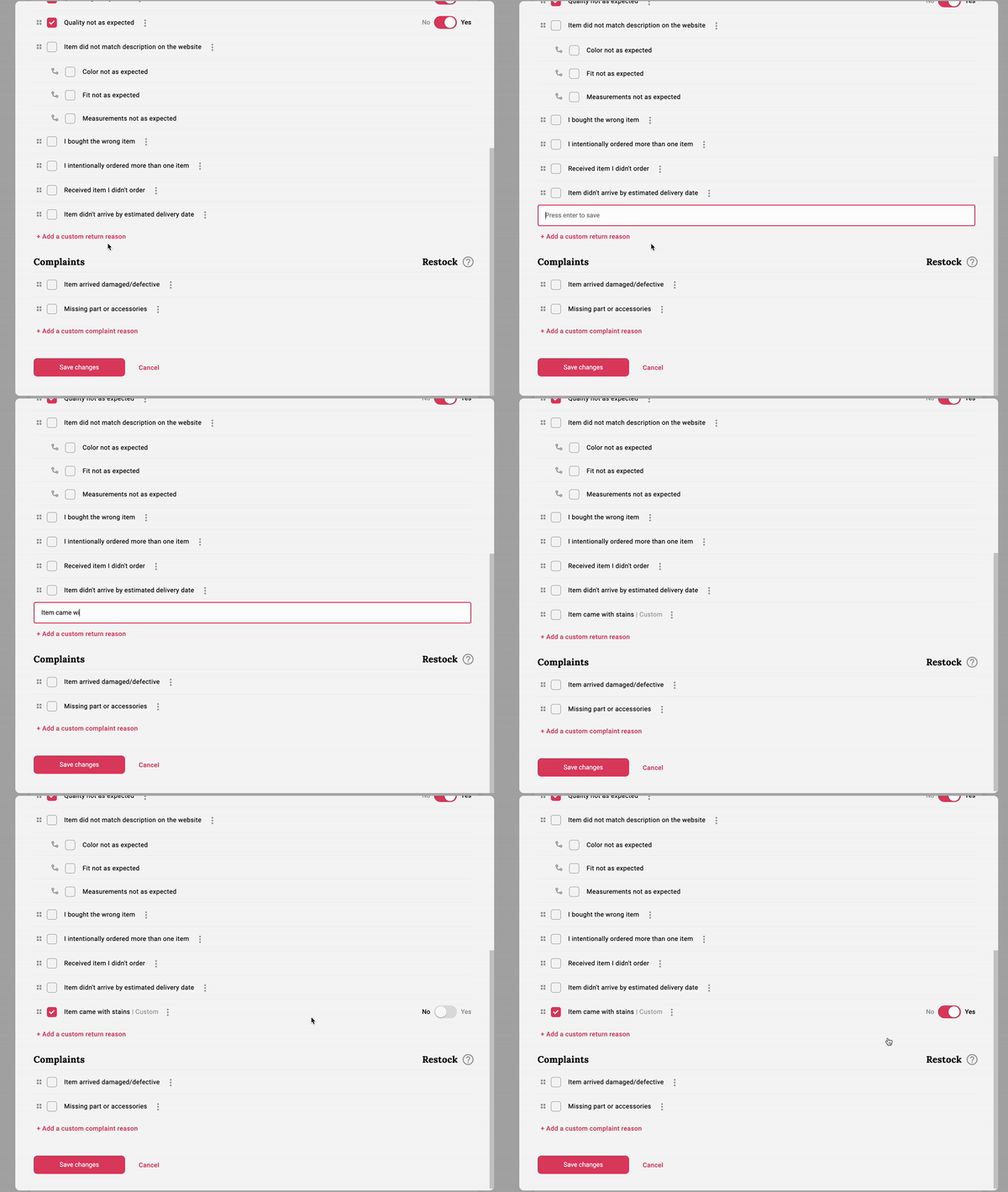
6. Choose/add your own return reasons. Returbo offers some default return options. Missing something? Add your own reasons.
- Select the return reasons you want your customers to use. Please also add whether to restock the items based on the reason or not. Finally, don’t forget to click ‘Save’ at the bottom of the screen.

- If you are using the predefined set of the reasons, then as you add them in one language, they are automatically added in all the 4 languages that we support (English, Swedish, Danish and Norwegian). Your customers will be able to see different return reasons in different languages when submitting a request.

- You can also add a custom reason. Bear in mind that you will need to translate that reason manually to other languages that your shop supports. So if you write a custom return reason in English, you will need to switch the language to Swedish, for example, and manually write a translation.
- Go to Settings→Account settings to find your digital return form. For more information on how to embed the form to your website, see this guide.

- Add your contact details so your customer knows how to contact you if they have any questions.
- Select your price plan. Returbo offers three plans after your business needs. Regardless of plan, we offer a 14 days free trial. Read more about our price plans here.

Tip: if you have any questions, don’t hesitate to reach out to our support team at support@returbo.io
Additional settings
Return deadline
This means that a customer will not be able to return an item using the digital return form after this date.

Summary emails and instant notifications
Select whether you want to get notified daily, weekly, monthly, or not at all regarding how many new returns you have.
Tip: Turn off the instant notifications if you have more than 10 returns a day to ensure you don’t get too many emails.

Return shipping cost
With Returbo you can automatically charge for the return shipping cost as well as refund your customer for the original shipping cost. Note that the currencies based on what market you are selling to in your Shopify store settings. Simply select which currencies you want to have for your standard charges and how much to deduct.
Tip: add that you charge and/or refund the original shipping in your return policy. You can an also edit the return policy that is on the digital return form in Settings→ Customization under ‘Return policy’.

Customize your return process
You can customize your digital return form and email notifications.
Digital return form
Go to Settings→ Customization. Customize your digital return form by adding your logo. Choose how you want it shown in the digital return form.

The automatic email notifications
With Returbo, your customers get an automatic notification when there is a status update.
- Select which languages languages you want your emails to be available in. We currently offer Swedish, English, Norwegian, and Danish.

2. Edit and customize your return form. Returbo has a default policy in place.
Tip: For more info on how to write a good return policy, have a look at this post on how to write one.

- You can edit and customize the status updates you customer receives. Bear in mind that you will need to translate that reason manually to other languages that your shop supports. So if you write a custom return reason in English, you will need to switch the language to Swedish, for example, and manually write a translation.

Integration
Returbo offers several shipping integrations.
- PostNord activates immediately after you add your customer number.
- Returbo also has its own contract with PostNord. Contact us at hello@returbo.io for more information.